










FAQ
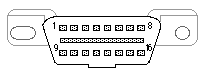
Many of our customer's frequently asked questions are answered here. What is On-Board Diagnostics (OBD II)? All 1996 and newer cars and trucks have a standardized computer interface connector used to connect external diagnostic equipment. When the "Service Engine Soon" or "Check Engine" light illuminates on your dashboard, the Auterra scan tool connects to your vehicle's diagnostic connector to read the stored diagnostic trouble code (DTC). The DTC helps you determine what's wrong with your vehicle. For instance, a DTC of P1234 could mean "Engine oil pressure too low fault". An overview of OBD II can be found here. Where is my vehicle's OBD II connector? OBD II compliant vehicles must also have a 16-pin connector located in plain sight underneath the dash near the driver's seat. Alternatively it may be behind ashtrays or concealed by an easily removed plastic cover, sometimes with the letters "OBD" stamped on the outside.
OBD II Connector (front view)
To help you find the connector on your vehicle, see the OBD II connector locations listed by vehicle manufacture/model/year. Will the Auterra DashDyno or Dyno-Scan work on my vehicle? All Auterra products supports all US 1996 and newer passenger cars, light-duty trucks, and medium-duty vehicles including Domestic, European, and Asian. Most diesel cars and trucks work with our scan tool (see table below). Heavy-duty vehicles with a gross vehicle weight rating (GVWR) exceeding 14,000 pounds also may not work with our scan tool. See the About CAN page for information regarding diesel and heavy-duty supported vehicles. Some 1994 and 1995 model year vehicles are also supported with an EPA sticker under the hood indicating OBD II compliance. All 1996 and later vehicles are OBD II compliant and do not require the under hood sticker. I live outside the US. Will the Auterra DashDyno or Dyno-Scan work on my vehicle? If you live within the United States, all 1996 and newer passenger cars, light-duty trucks, and medium-duty vehicles are required to support OBD II diagnostics. If you live within Europe and the UK, EOBD (European On-Board Diagnostics) is required. The Dyno-Scan works on EOBD vehicles. If you within any other country not listed above, the your country may have started requiring OBD in other years or have no mandated OBD II requirements.
The "Fully Supported Years" column means that 100% of the vehicles sold in that country conform to OBD II or EOBD starting in the year listed. The "Incompletely Supported Years" column means that some vehicles within that country will work with the Dyno-Scan, and some will not. It your vehicle lies in the incompletely supported years range, the OBD II Connector Pinout page can help determine if your vehicle will work with our scan tool. Does your scan tool support European EOBD? Yes, European EOBD (European On-Board Diagnostics) equipped vehicles work with the DashDyno / Dyno-Scan. What PC requirements are there to run the Dyno-Scan for Windows software? Dyno-Scan for Windows runs on the following Windows operating systems.
The computer must meet the following hardware requirements.
The A-501, A-500 and A-302 kits connects directly to any PC USB port. The A-303 kit connects wirelessly over Bluetooth. Are Macintosh computers supported? Yes, only if the Mac is running Parallels Desktop for Mac. Is airbag (SIR) or antilock brake (ABS) systems supported? Yes, for some make/model vehicles if you purchase an enhanced OBD II software upgrade for your Auterra scan tool. Will your scan tool read manufacturer specific trouble codes? Yes, the scan tool reads both generic and manufacturer specific trouble codes for powertrain, emission, and network communication type errors. It will also read ABS and airbag codes if you purchase an enhanced OBD II software upgrade. How are enhanced OBD II software updates handled? Enhanced OBD II software packages have free updates for all minor version releases. For instance, if you purchase version 1.0 you will receive updates up until version 1.9. When the software major version number changes to 2.0 a software update needs to be purchased. Where do I get software updates? The Downloads page has all software updates. See the software updates policy. If I purchase DashDyno, can I use the Dyno-Scan Windows software to connect to a vehicle? Yes. The DashDyno has a pass-through mode where the PC communicates to the vehicle through DashDyno using a USB cable. You can use all of the features of Dyno-Scan while connected to the vehicle. What type of GPS will connect to DashDyno? Any serial GPS receiver will connect to DashDyno. The GPS receiver can be a handheld, such as the Garmin eTrex series, an in-vehicle mounted GPS, or can be a "puck" style GPS without a display. A USB receiver will not work. How does DashDyno measure wideband air/fuel ratio (AFR)? DashDyno measures air/fuel ratio in one of two ways. First, if the vehicle is factory equipped with a wideband O2 sensor then DashDyno reads AFR directly from the vehicle ECU. If the vehicle has a narrow band O2 sensor, then an external wideband controller is required (such as the Innovate LC-1 or LM-1). The analog output of the wideband controller is connected to the analog input on DashDyno. Once connected, air/fuel ratio can be viewed on-screen and recorded with all the other sensors. Do I need to pay for Google Earth service when playing back DashDyno recorded files? No. The free Google Earth software and service is all that is required to playback DashDyno files containing GPS data. Why would I want to purchase an Auterra scan tool? See our Why a Scan Tool? page for more information on how a scan tool can help the average vehicle owner. What is CAN bus? Starting with model year 2003, select vehicle makes and models started using a new means of diagnostic communication called CAN. By model year 2008, all vehicles sold in the US must use CAN. All Auterra products support all OBD II protocols, including CAN bus. See our About CAN page for a list of CAN bus equipped vehicles. What vehicle protocols does the Auterra OBD II scan tool support? The Auterra DashDyno and Dyno-Scan kits support all OBD II protocols including J1850 (VPW, PWM), ISO 9141, ISO 14230 (KWP 2000), and ISO 15765 (CAN).Is an accelerometer used to measure horsepower and torque? No. Like a standard chassis dyno, such as Dynojet, speed and RPM are used to determine horsepower and torque. Most accelerometer dynos only provide an estimated horsepower/torque figure since they do not have access to the vehicle's RPM. Auterra's products create graphs to reveal HP/torque at any RPM. What sensors are supported by the scan tool? See our Supported Parameters page for a complete list of sensors and parameters. How much sensor data can I record onto the DashDyno?The DashDyno recording capacity is only limited by the size of the SD / MMC card. A 2GB SD card will provide hundreds of hours of recording time. Can I export recorded data to a spreadsheet? Yes. The Dyno-Scan for Windows exports data to a spreadsheet in a CSV (comma separated value) file format. Do you support pre-1996 vehicles? No, our scan tool supports 1996 and later vehicles except for a limited subset of 1994 and 1995 model year vehicles. Do I need special tools? No special tools are required to access the vehicle's 16-pin OBD II connector. It is usually in plain sight underneath the dash. Will a scan tool harm my vehicle? No. The scan tool only reads values from the vehicle and does not control vehicle operation. |
||||||||||||||||||||||||

Auterra OBD II Scan Tools, Performance Meters and Data Loggers Copyright Auterra, LLC All Rights Reserved. | Contact Us | About Us | Home |